


Table of Contents
A filing deadline is hours away, and the shared folder won’t open. A tenant ticket sits while staff wait for a password reset. This is why managed services vs professional services matters: steady IT support keeps work from stalling, while planned project help improves how work gets done. Rollout AI supports professional services firms with 10 to 100 employees with security, uptime, fast support, practical AI guidance, and a dedicated contact.
Rahul Dewan, CTO at Rollout AI, notes: “The right IT support model should fix today’s ticket, then ask why the same problem keeps showing up in the first place.”
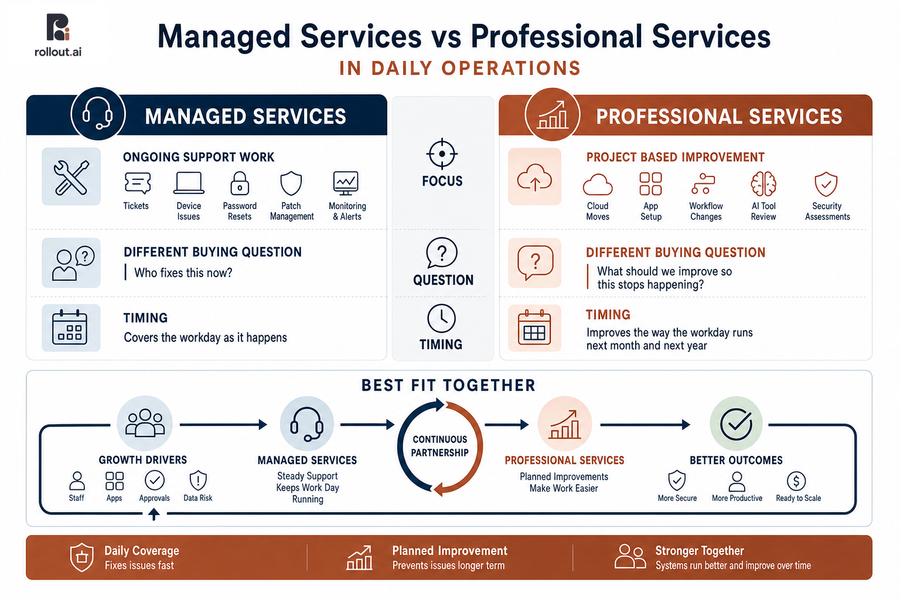
Managed Services Vs Professional Services In Daily Operations
The simplest way to sort the two is by timing. One covers the workday as it happens. The other improves how the workday runs next month and next year. That matters when cybersecurity is the top challenge that led 60% of respondents to work with outside IT support.
-
Ongoing support work: Daily IT support for tickets, device issues, password resets, basic troubleshooting, patching, device care, monitoring, and alerts, so an invoice approval doesn’t wait on a frozen laptop.
-
Project based improvement: Cloud moves, app setup, workflow changes, AI tool review, annual security assessments, and cleaner systems for client data.
-
Different buying questions: Daily coverage asks, “Who fixes this now?” Planned change asks, “What should we improve so this stops happening?”
-
Best fit together: Growth adds staff, apps, approvals, and data risk. We handle steady support and improvement work, so systems don’t just run; they get easier to use.
Managed Services And Professional Services For Cleaner Handoffs
Handoffs fail when support teams close tickets without reading the pattern behind them. A password reset is simple, but five access tickets tied to the same client intake folder point to a workflow problem. That’s where our monthly tech stack reviews turn repeat issues into a clear plan, explained in plain words.
-
Ticket patterns show gaps: Repeated tickets about intake forms, matter folders, or tenant work orders show where staff lose time.
-
Cloud apps slow approvals: If a manager can’t approve an invoice from home, app and cloud support should fix access and review the setup.
-
Security settings add work: Good security shouldn’t force staff into side folders. We explain settings and adjust the path.
-
Backups and access need plans: A missed file restore or blocked records request needs a planned fix, not another one-off ticket.
-
Monthly reviews create action: Your dedicated contact turns repeat pain into practical next steps.
Managed Services Or Professional Services For Risk And Continuity
Risk work needs both steady watch and planned care. Ongoing coverage handles backup alerts, patching, email security issues, and device checks. A focused project handles annual security assessments, compliance prep, or a cleaner backup plan for client files.
Think of a staff laptop that needs a patch before travel, or a backup alert that appears before a client file is lost. Our Free Email Security Scanner can also find a bad link issue before staff click it. These are calm, fixable moments when someone watches the right signals.
The need is real, but the response should stay practical: professional and scientific services represented around 18% of one set of impacted sectors, and attacks against Professional Services reached 100 notices in another report.
From there, the question becomes which capabilities reduce risk without slowing work. Continuous monitoring and alerting, backup and disaster recovery, cloud app support, and security reviews all help keep files available, devices current, approvals moving, and client data safer.
More On Managed IT Decisions
Choosing Managed Services With Professional Services Support
The right support reduces repeat interruptions and gives leaders a clear plan for what to fix next. It also makes costs easier to read, so the team doesn’t hold back on small tickets just to protect a budget.
-
Fewer repeat work stoppages
Monitoring, alerts, and under 15-minute response help staff stay in motion when a device fails before a client meeting.
-
Clearer technology spending plans
We price support at $85 per seat per month for unlimited support. No surprise invoices and no ticket budgets.
-
Better security follow through
Plain-English Security Reports and reviews turn risk into next steps, such as patching laptops or tightening access to client records.
-
Faster app and cloud fixes
Application and cloud support helps restore access when approvals stall in a billing app or a shared folder blocks a deadline.
-
Smarter process upgrades over time
AI tool review, automation, and workflow fixes reduce manual re-entry over time, guided by a dedicated point of contact who knows how your team works.
Build Your Right IT Support Mix
Balance daily support with smarter project work. Rollout AI helps professional services firms keep work moving and improve what slows teams down.
From Managed Services To Professional Services Improvements
Changing IT support can feel hard because people depend on familiar apps, approval paths, client records, and devices every day. A calm review gives you a safe place to start, then monthly tech stack meetings keep the work moving. We bring a business-first view, plus practical AI planning from founders who built AI products at Google DeepMind and shipped software used by millions at Apple.
-
Review recent ticket history: Look at the last 30 to 60 days of tickets for repeat password issues, printer problems, file access delays, and app errors tied to the same workflow.
-
Map daily work tools: List cloud apps, approval workflows, client data systems, shared folders, phones, laptops, and office devices.
-
Check risk signals: Review backup alerts, patch status, email security, staff access gaps, and compliance needs tied to SOC2, HIPAA, or GDPR.
-
Pick one improvement: Choose one workflow for the next monthly review, such as custom automation, AI tool evaluation, web and app development, or a fractional Chief AI Officer plan.
Build The Right IT Support Mix
The right mix of daily support and planned improvement gives staff fewer interruptions, safer client data, clearer costs, and more time for client-facing work. Clients often describe us as available, quick to address needs, proactive, and close enough to feel like part of the team, which is how IT support should feel when invoices, records, tickets, and deadlines are moving.
We pair reliable support with a dedicated point of contact, quick issue resolution, monthly tech stack reviews, and $85 per seat per month for unlimited support, backed by a 60-day money-back guarantee. If you want IT support that fixes daily issues and helps your systems improve over time, contact Rollout AI and we’ll help you sort the right next step.