


Table of Contents
-
Staff Augmentation Vs Managed Services For Daily IT Pressure
-
Choosing Between Managed Services Vs Staff Augmentation During Growth
-
Staff Augmentation And Managed Services As Separate Operating Choices
-
Managed Services And Staff Augmentation For Applications And Cloud Work
-
Using Staff Augmentation With Managed Services For AI-Ready Operations
-
Building The Right Managed Services And Staff Augmentation Plan
Choosing between more hands and clearer ownership affects how fast tickets move, how clean invoices stay, and how much risk sits on your team. The real question behind staff augmentation vs managed services is simple: do you need extra capacity, an outside owner for outcomes, or both?
Rahul Dewan, CTO at Rollout AI, notes: “Start with the work that slows client service, then decide whether you need more people, clearer ownership, or a combined plan that fixes repeat issues.”
That choice shapes response time, approvals, invoices, open tickets, and growth. It also changes how leaders compare managed services vs staff augmentation when daily work gets heavier. IBM reported higher breach costs when staffing shortages were high, $5.74 million compared with $3.98 million when shortages were low or absent.
Staff Augmentation Vs Managed Services For Daily IT Pressure
Busy weeks reveal the gaps fast. A delayed password reset holds up a client file. A vendor case sits open with no clear owner. A billing app fails before invoices go out. This pressure grows when teams are short on time and skill. An ISC2 survey showed 24% of cybersecurity departments faced layoffs in 2024 and 67% said they no longer had staff to meet goals.
-
Control of the work: Staff augmentation adds time for tasks your team directs. Ongoing IT support owns tickets, follow-up, and results.
-
Speed of support: A response under 15 minutes helps client-facing staff get back to files, calls, approvals, and deadline work.
-
Budget visibility: Clear pricing, such as $85 per seat per month for unlimited support, removes surprise invoices and ticket limits.
-
Long-term improvement: The right model tracks repeat issues and turns them into fixes, so your team spends less time fighting with technology.
Choosing Between Managed Services Vs Staff Augmentation During Growth
Growth adds clients, tools, and approval steps. The old support setup starts to strain when one person is chasing tickets, checking invoices, and asking vendors for updates during the same deadline.
What this looks like in practice. A new employee needs email and app access by 9 a.m. A key case app fails before a client packet is due. A vendor invoice needs review because the line items do not match the contract, and a cloud folder permission issue blocks the team from opening the final file.
That kind of day calls for planning, not guesswork.
Ticket intake, app support, cloud access, and vendor coordination need clear owners. Leaders should see what is fixed, what is waiting, and what needs a business decision.
Staff Augmentation And Managed Services As Separate Operating Choices
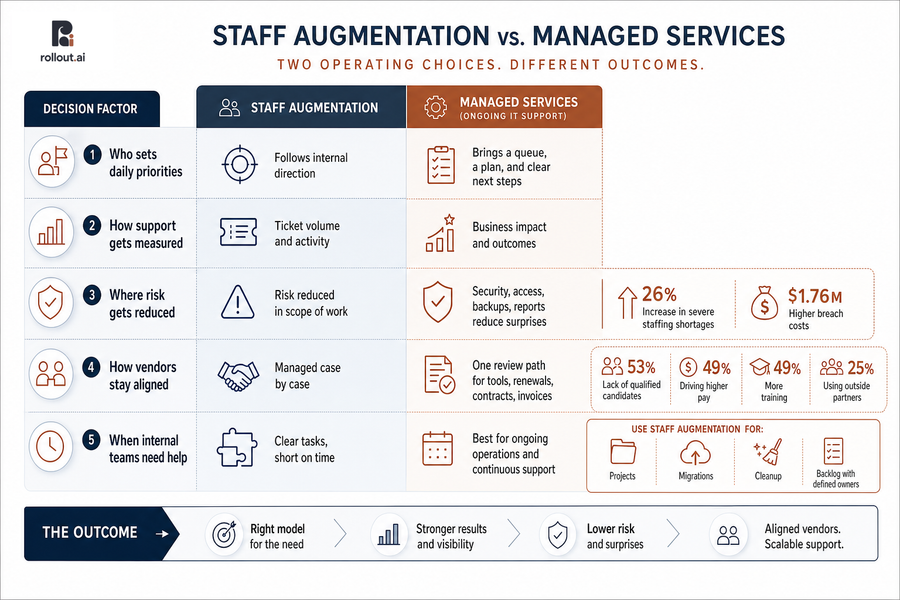
The operating choice is about direction and results. One model adds time to a team that already knows the work. The other brings structure, reporting, and ownership across your systems.
-
Who sets daily priorities: Staff augmentation usually follows internal direction. Ongoing IT support should bring a queue, a plan, and clear next steps.
-
How support gets measured: Count business impact, not just ticket volume. A fixed billing app before month-end matters more than a closed low-value request.
-
Where risk gets reduced: Security, access, backups, and plain-English reports reduce surprises. IBM found severe staffing shortages rose 26% and were tied to $1.76 million in higher breach costs.
-
How vendors stay aligned: Tool selection, renewals, contracts, and invoices need one review path. KPMG found 53% cited lack of qualified candidates, driving higher pay at 49%, more training at 49%, and outside partners at 25%.
-
When internal teams need help: Staff augmentation works well when tasks are clear but time is short. Use it for projects, migrations, cleanup, or a backlog with defined owners.
Explore IT Service Model Choices
Managed Services And Staff Augmentation For Applications And Cloud Work
Client work now moves through apps, shared folders, billing tools, and approval screens. When a document system stalls or a cloud folder blocks access, the issue delays review, billing, and client updates.
Leaders need clear ownership across these tools because app support, Managed Cloud Services, vendor tickets, and business hours with emergency coverage touch the same workday. A good plan shows who acts first, who calls the vendor, and who fixes repeat problems before they become weekly tickets.
-
Map key apps: List which tools carry client work, billing, documents, and approvals.
-
Assign ticket ownership: Name who handles support tickets, vendor cases, and access changes.
-
Review cloud permissions: Check shared folders so staff can work without exposing sensitive data.
-
Fix repeat issues: Track the same app errors or access problems and turn them into lasting fixes.
Choose Your Best IT Support Model
Need extra capacity, clearer ownership, or both? Rollout AI helps MSPs align support models with growth pressure.
Using Staff Augmentation With Managed Services For AI-Ready Operations
AI works best when daily operations are clean. That means clear steps, safe data access, useful tools, and leaders who know which tasks deserve automation. IBM found 87% of executives believe employees are more likely to be augmented than replaced by generative AI.
-
Cleaner work before automation: Fix broken handoffs first. AI should not speed up a bad approval path or copy messy data into more places.
-
Better tool decisions: Reviewing AI tools reduces waste and helps avoid risky apps that store client data in the wrong place.
-
Clearer data access rules: Good permissions protect client files while still helping staff find the right matter, account, lease, or report.
-
Dedicated AI leadership time: Fractional Chief AI Officer support can guide priorities, approvals, and rollout plans. Rollout AI’s AI strategy is shaped by leaders with Google DeepMind experience and Apple product experience, but the goal stays simple: better work.
Building The Right Managed Services And Staff Augmentation Plan
Changing IT support models takes care. People already have habits, open tickets, vendor contacts, invoices, and deadlines in motion. A clear plan helps leaders compare cost, speed, and risk without guesswork.
-
Group recurring tickets: Review recent issues and sort them by device, app, cloud access, vendor, and security.
-
Separate judgment from ownership: Mark which issues need an internal business decision and which an outside IT partner should own.
-
Check every invoice: Look for surprise charges, unclear line items, and ticket limits that make teams wait to ask for help.
-
Pick one slow workflow: Choose a process, such as client intake or monthly billing, then define the better outcome.
-
Build a 90-day plan: Cover response times, vendor ownership, plain-English security reporting, compliance needs, and small improvement projects.
Next Step For Stronger IT Support
The right model should make daily work easier, show costs clearly, reduce repeat IT issues, and give leaders a clear plan for growth.
If a new hire, a failed app, a vendor invoice, and a blocked shared folder can all slow the same workday, your support model needs clear owners. Contact Rollout AI if you want help choosing the right mix of staff support, IT support, application support, cloud support, and AI strategy.