


Table of Contents
Client work depends on small steps happening on time. A file opens. A shared inbox sends. A billing system loads. An approval moves from one person to the next. When those steps stall, staff lose time and client service slows.
Rahul Dewan, CTO at Rollout AI, notes: “The real cost is not the repair ticket, it is the partner, advisor, or manager waiting while client work sits unfinished.”
That is why the choice between break fix vs managed services matters now for firms that run on deadlines, documents, and trust. The right support model helps reduce repeat issues, make IT costs easier to read, and give your team one clear contact who knows your systems.
Why Break Fix Vs Managed Services Changes Daily Operations
The main difference is timing. One model waits until something breaks. The other watches, updates, protects, and improves your systems before preventable issues slow work.
-
Support timing matters: Reactive help starts after a staff member is already blocked from email, a client file, or a cloud app.
-
Costs become clearer: Planned support makes monthly IT spend easier to read, so a login ticket or device setup does not turn into a surprise invoice.
-
Staff regain focus: Fewer repeat problems with devices, passwords, software, and shared inboxes means more time for client calls, reports, and approvals.
-
Risk gets managed earlier: Patching, backups, and security checks help reduce preventable exposure before it becomes a larger business issue.
The practical choice starts with where your team loses time today. Look at monitoring, patching, backups, and device support.
Where Break Fix Services Create Hidden Workflow Drag
Picture a client packet due before noon. The reviewer cannot open the shared folder, the billing app rejects a login, and the person who approves the invoice waits for access. None of those issues looks large alone. Together, they slow the handoff and pull staff away from paid work.
A laptop fails before a client meeting, so notes, slides, and signed forms sit out of reach. A shared drive permission issue delays document review while staff send files back and forth by email. A billing app login problem blocks invoices from going out before the close of the day.
Break fix services fit one-off repairs. They do not fit as well when the same login, device, app, printer, cloud file, or secure email issue returns each week. With managed support, response speed under 15 minutes, unlimited small tickets, and no surprise invoices help teams stop treating every small issue as a budget choice.
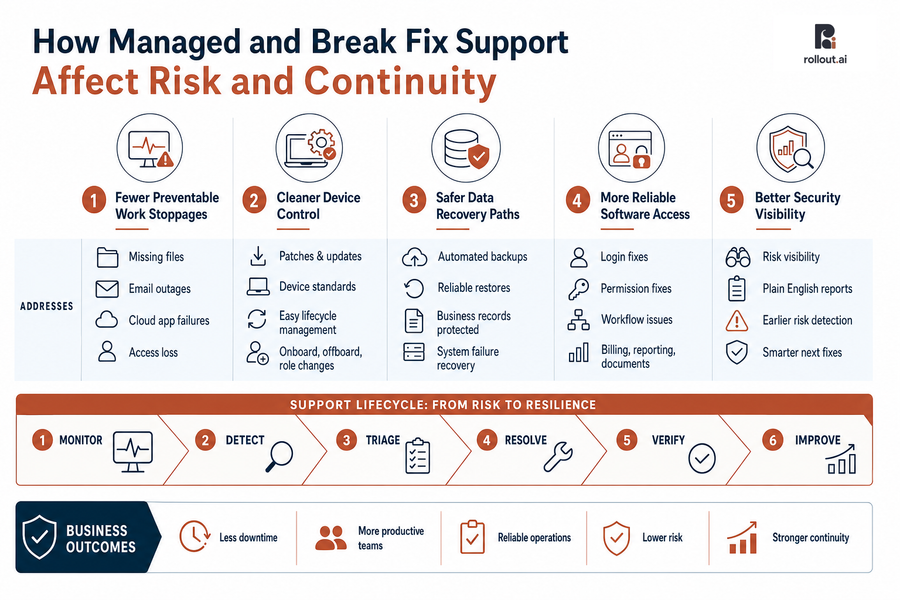
How Managed And Break Fix Support Affect Risk And Continuity
Risk shows up inside normal work: a missing file, an old app, a locked account, or a device that is not ready for a new hire. Managed support gives those weak spots a regular review cycle, so leaders can protect daily work before small gaps turn into missed deadlines, stalled invoices, or lost client trust.
-
Fewer preventable work stoppages
Continuous monitoring and alerts help spot trouble before staff lose access to files, email, or cloud apps during client work. -
Cleaner device control
Device management keeps staff computers updated and easier to replace when someone joins, leaves, or changes roles. -
Safer data recovery paths
Backup and recovery support protects client files, invoices, reports, rent rolls, and operating records when data is deleted or a system fails. -
More reliable software access
Application support helps fix login, permission, and workflow issues faster, especially in billing, reporting, and document systems. -
Better security visibility
Security reviews matter because 91% of codebases contain components with no new development in over two years. Plain English reports help leaders see risk sooner and choose the next fix.
More On Managed IT Models
What Managed IT Support And Break Fix Choices Mean For Growth
Growth adds pressure to every system. New hires need devices, accounts, apps, email groups, and file access set up cleanly. Client service improves when staff are not waiting on the same fixes, and monthly reviews show leaders which tools help work move faster.
-
List repeat tickets: Review recurring support requests from the last 60 to 90 days, including logins, devices, apps, printers, cloud access, and email.
-
Map deadline systems: Identify the systems tied to client deadlines, invoice approvals, reports, and secure file sharing.
-
Check approval paths: Review who approves software access, device changes, and new app requests.
-
Confirm backup coverage: Make sure key folders, cloud apps, invoices, and client records are covered.
-
Ask for plain reports: Require clear notes on open risks, fixes, and next steps.
Stable systems also make AI planning more practical. Our founders built AI products at Google DeepMind and shipped software used by millions at Apple, so we start with safe workflows, clean data paths, and useful automation. For software work, Anthropic found that the share of sessions spent fixing broken code fell from 33% to 19%. That result is about coding, but the lesson is useful: AI works best when it is tied to a clear process. AI tool reviews, custom automation, and Fractional Chief AI Officer support work best when staff habits, vendor contracts, and approval steps are clear.
Move Beyond Break Fix IT
If recurring IT issues are slowing daily work, Rollout AI can help you plan a steadier managed support model.
Choosing Between Managed Support And Break Fix IT With Confidence
Judge support by business outcomes, not ticket language. Look at response speed, cost clarity, security confidence, staff productivity, and growth readiness. A dedicated point of contact, under 15-minute response, monthly reviews, and plain-language updates all matter when client work is moving.
-
Rare, low-impact issues: One-time fixes work when a device problem or printer issue does not affect deadlines, billing, or client access.
-
Weekly staff delays: If people lose time to logins, devices, apps, printers, cloud access, or email, managed support gives leaders better control.
-
Client data and risk: If client data, billing, deadlines, or compliance are involved, proactive reviews and security checks matter. IBM reports that Sixty-three percent of organizations said they would raise prices because of a breach this year.
-
Cleaner planning: Transparent pricing, such as $85 per seat per month for unlimited support, removes invoice guesswork. Unlimited small tickets under 15 minutes also reduces ticket budget stress.
Build Steadier Operations With Managed Support Over Break Fix
Fewer interruptions, clearer costs, stronger data protection, faster support, and better growth capacity all start with knowing where work slows down today. Rollout AI can review your current support, recurring tickets, cloud apps, devices, backups, and security risks in plain English.
We act like an extension of your team, with a dedicated point of contact and transparent $85 per seat per month pricing for unlimited support, so IT conversations stay tied to deadlines, invoices, files, and staff productivity. If the shared folder, billing login, or laptop issue from earlier feels familiar, contact us and we will help you see the next practical step.