


Table of Contents
A billing lead clicks approve, but the invoice app freezes. A ticket goes in, the fix lands fast, and the invoice moves before the client follow-up call. That small save protects cash flow, client trust, and staff focus.
Rahul Dewan, CTO at Rollout AI, notes: “Good IT support shows up in the workday, fewer stalled approvals, fewer repeat tickets, clearer risks, and faster paths back to client work.”
That is why the types of managed services matter. For busy teams, IT support should reduce daily friction, not just keep systems alive. Security gaps add pressure too, with 74% saying skill gaps hurt 2025 goals.
Types Of Managed Services For Work That Cannot Sit Still
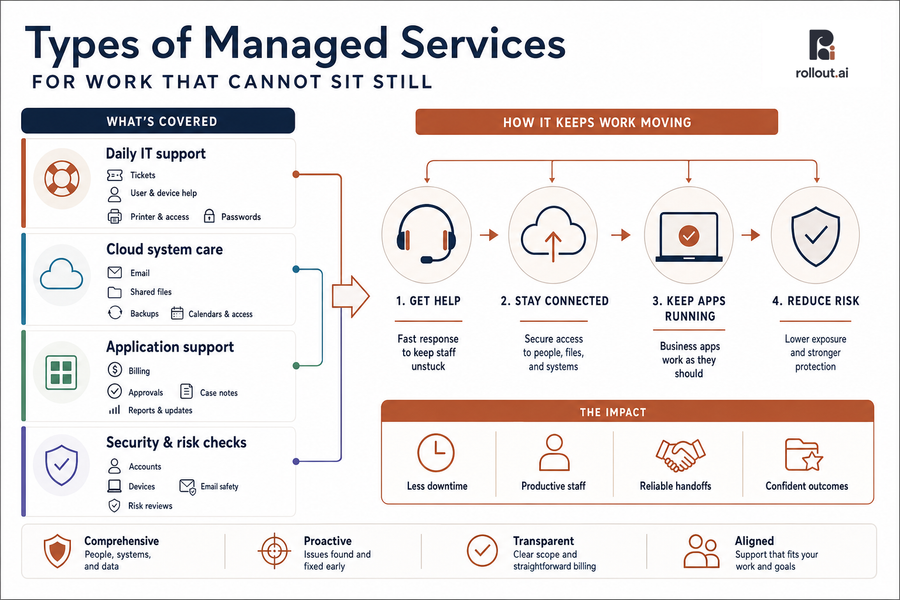
Before you compare IT support, you need a clear map of what support covers. Without that, a low monthly fee can hide slow answers, unclear invoices, and gaps that show up when someone can’t open a client file before a deadline.
-
Daily IT support: Help with tickets, computers, passwords, printer access, user setup, and common app problems.
-
Cloud system care: Support for email, shared files, backups, calendars, and user access.
-
Application support: Fixes for business apps when billing, approvals, case notes, tenant updates, or reports get stuck.
-
Security and risk checks: Plain-English reviews of accounts, devices, and email safety, especially as Trend found 33% rely on managed detection and response or managed security service offerings, compared with 27% using rotating schedules and 25% using on-call systems.
Clarity matters because every support choice affects the next ticket, approval, and client handoff.
Types Of Managed IT Services That Lower Ticket Volume
Small issues pile up when no one owns the pattern. A password reset becomes three follow-ups, a printer ticket delays a packet, and a billing app error returns every Friday. The right types of managed IT services reduce repeat work and help staff return to client work faster.
-
Faster help for everyday issues: Quick answers for passwords, computer trouble, printer access, and common app problems reduce waiting. Our under 15-minute response time helps keep a simple fix from becoming a lost morning.
-
Cleaner access and approvals: User setup, role changes, and exit steps need care. When access is right, staff don’t wait for files they need or keep access they no longer should have.
-
More stable cloud tools: Email, shared files, calendars, and chat tools carry daily work. Keeping them usable protects client follow-ups and internal deadlines.
-
Less repeat application pain: App support should fix the workflow, not just close the ticket. Billing, case work, client updates, and property workflows keep moving with less rework.
-
Better visibility for leaders: Reports should show ticket patterns, risks, and next fixes, because 40% of security alerts go uninvestigated when teams are overloaded.
Types Of IT Managed Services For Cloud And Application Support
Cloud tools and business apps now carry much of the workday. Email confirms client details, shared files hold records, calendars drive meetings, and approval steps move invoices or reports forward. That is why we offer managed cloud support, along with application managed services and support. The need is real, since 69% say their team lacks the skills needed to manage cloud applications well.
What this looks like in practice: An invoice sits in an approval queue because the app will not load for one approver. A shared client folder blocks access for a new staff member, or a calendar sync issue delays a client meeting.
The goal is to keep work moving through the system, not just confirm that a tool is online.
The core areas are cloud support, application support, user access, and workflow fixes. These types of IT managed services affect daily handoffs most often.
Explore Managed IT Service Essentials
Managed Service Types For Safer Systems And Steadier Uptime
Leaders need to know systems are protected, updated, and watched without needing everyone to become IT experts. Security and uptime work must be clear enough to guide choices about client data, staff access, and business risk.
Older tools and quiet gaps create extra work. For example, 91% of codebases contain parts with no new development in over two years, and weak logging slowed investigation and response in about a third of engagements.
-
Plain-English security reviews: Reports should explain what was checked, what was found, and what needs to be fixed.
-
Safer email and accounts: Settings should reduce risky sign-ins and help staff spot unsafe messages.
-
Device health checks: Computers need updates, health checks, and fixes before slowdowns spread.
-
Backup and recovery planning: Backups need testing, so file recovery is more than a hope.
Security reports should support business decisions, not just technical review.
Reduce IT Friction Before It Slows Work
See how Rollout AI helps MSPs align managed service types with faster tickets, steadier uptime, and calmer daily operations.
Choosing Service Types That Grow With Your Team
Once support areas are clear, the next step is deciding what the business needs first. Changing IT support is not just a vendor choice. Teams have habits, old systems, past frustration, and fair concerns about disruption.
-
Review recent tickets: List repeat tickets from the last 30 to 60 days, such as password resets, app errors, printer issues, and file access requests.
-
Find slow apps: Identify tools that delay approvals, billing, client updates, reports, or document handoffs.
-
Map wait points: Note where staff wait most often for access, fixes, or answers before they can finish client work.
-
Check pricing clearly: Ask what is included before signing. We use transparent pricing at $85 per seat per month for unlimited support, with no surprise invoices.
-
Assign improvement ownership: Decide who follows up after tickets close, so the same issue does not return next week.
A dedicated contact helps turn that review into steady improvement, not another one-time cleanup.
A Clearer Path To Calmer Daily Operations
The right IT support mix lowers ticket noise, improves uptime, supports cloud tools and business apps, strengthens security, and gives staff more time for client work. At Rollout AI, we provide Fully Managed IT Services and Professional Services IT Services for professional services firms with 10-100 employees, including law practices, financial advisory firms, and property managers.
If support feels slow, unclear, or too reactive, contact us. We can review where work gets stuck across tickets, approvals, apps, devices, and cloud systems, then show where stronger support or AI strategy can help your team move with less friction.